

Project 2019 Professional – Retail License
22,90 €
Price includes VAT where it applies. Business customers can enter a valid EU VAT number at checkout to have VAT removed.
100 in stock
● In your inbox in under 3 minutes — instant digital delivery
Microsoft Project 2019 Professional is a powerful desktop project management solution for Windows, designed for professionals and businesses that need advanced planning, scheduling, reporting, and resource management tools with a lifetime license—no subscriptions, no recurring fees.
As a Microsoft Partner (ID: 7033487), we provide genuine keys with Instant Online Activation.
- ✅ Lifetime / Perpetual License
- ✅ Instant Digital Delivery
- ✅ Professional IT support & Help with the Product Activation included
- ✅ Ideal for project planning, timelines, reporting, and resource management
Warranty: Includes our 1-Month Activation Guarantee to be eligible for our lifetime replacement warranty.
SSL encrypted · refund if activation fails
Description
Why buy from Arco Software?
- ✅ Microsoft Partner (ID: 7033487): Ensure your license is authentic and secure.
- ✅ Instant Digital Delivery: Get started within minutes of purchase.
- ✅ 24/7 Support: We offer email and remote installation support if needed.
- ✅ Money-Back Guarantee: We offer a refund if activation fails (within the warranty period and according to our Terms & Conditions).
What is Microsoft Project 2019 Professional?
Microsoft Project 2019 Professional is built for project managers, consultants, engineers, construction planners, and businesses that need advanced project planning software without ongoing subscription costs. As a Microsoft Partner (ID: 7033487), we provide 100% genuine, new retail licenses.
This is a perpetual (non-subscription) Retail license for Windows with a one-time purchase. The license is intended for activation on one Windows PC. Depending on the selected license variant, it may be linked to your Microsoft Account or provided as a standard retail key. Reinstallation on the same device is supported, and some variants may allow transfer to one replacement PC as described in the product options.
Key Features of Microsoft Project 2019 Professional
- ✅ Advanced Project Planning: Build structured project plans with task scheduling, dependencies, milestones, and timelines.
- ✅ Resource Management: Assign and monitor resources, workloads, and task allocation more efficiently.
- ✅ Built-In Reporting: Use professional reports to track progress, deadlines, costs, and project performance.
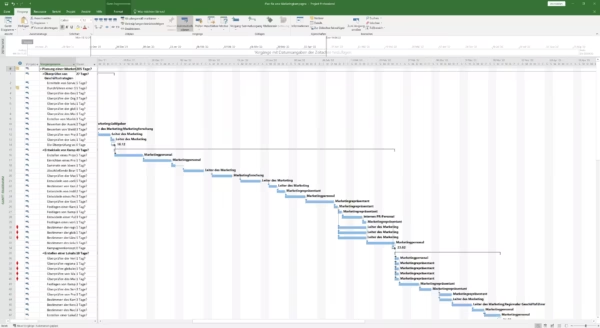
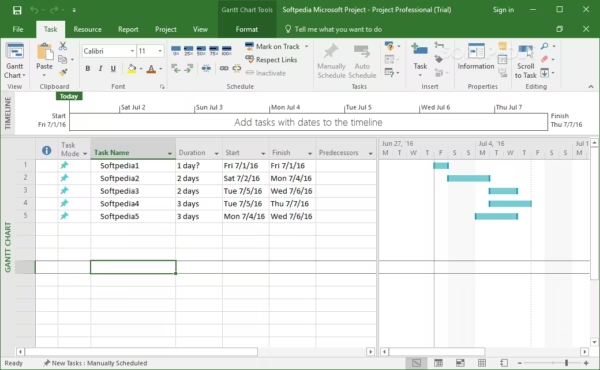
- ✅ Timeline View: Present project phases and important milestones in a visually clear format.
- ✅ Professional Project Control: Ideal for companies and specialists who need more advanced tools than standard task management software.
What’s New in Project 2019 Professional?
- ✅ Improved Task Linking: Better control over task relationships for more precise scheduling.
- ✅ Enhanced Timeline Features: Easier visual management of project phases and milestone tracking.
- ✅ Smarter Resource Handling: Improved planning for teams, workloads, and project allocation.
- ✅ More Modern Interface: A cleaner and more refined user experience compared to older releases.
Key Benefits
Professional Project Management
Organize complex projects with clear schedules, task dependencies, resource assignments, and reporting tools. Microsoft Project 2019 Professional is designed for users who need full desktop project management software for serious business use.
Offline Use
Project 2019 Professional works as a classic desktop application and remains fully usable offline after installation and activation.
Product Specifications
| Brand | Microsoft |
|---|---|
| Edition | Project Professional 2019 |
| Key Format | Retail Key |
| License Type | Perpetual (Lifetime) |
| Intended Use | Business / Commercial Use |
| Language | Multilingual |
| Architecture | 64-bit (x64) default / 32-bit compatible |
| Activation Method | Online Activation |
| Region | Global |
How to Activate Your License
- After purchase, you will receive a secure download link (Installer) and your Product Key via email.
- Download and run the installer software.
- Wait for the installation to complete.
- Open Microsoft Project.
- If prompted, enter your 25-digit product key (or sign in with your Microsoft Account if your selected variant uses account-based activation).
- Select “Activate Online” to verify your genuine license instantly.
Note: Detailed installation instructions are provided in the confirmation email.
Minimum System Requirements
| Operating System | Windows 10 or Windows 11 |
|---|---|
| Processor | 1.6 GHz or faster, 2-core |
| RAM | 4 GB (64-bit) |
| Storage | 4 GB of available disk space |
| Graphics | DirectX 10 graphics card required for graphics acceleration |
Standard vs. Professional – Which One Do You Actually Need?
If you only need classic project planning, Gantt charts, task scheduling, and reporting, Project Standard 2019 is usually enough. But if you need more advanced project control, stronger resource handling, and extra business-oriented tools, Project Professional 2019 is the better fit.
| I need this feature… | Project 2019 Standard | Project 2019 Professional (This Product) |
|---|---|---|
| I just need project planning, timelines, Gantt charts, and task tracking | ✅ YES | ✅ YES |
| I need advanced resource management | ❌ NO | ✅ YES |
| I need timesheets for project and non-project work | ❌ NO | ✅ YES |
| I manage more complex projects and need stronger control tools | ⚠️ LIMITED | ✅ YES |
| I want the higher edition with more advanced capabilities | ❌ NO | ✅ YES |
| Best choice for | Users who need core planning and scheduling tools without paying extra for advanced features they may not use | Project managers and business users who need more advanced project management capabilities |
Frequently Asked Questions
Is this a subscription?
No. This is a perpetual (non-subscription) license with a one-time payment.
Does it work on macOS?
No. This version is for Windows only.
Can I reinstall the software?
Yes. Reinstallation on the same PC is supported. If your selected license variant includes transfer rights, it may also be moved to one replacement PC as described in the product option.
Do I need an internet connection?
Only for the initial download and activation. After activation, Microsoft Project works offline.
What languages are available?
Microsoft Project 2019 Professional supports multiple languages depending on installation and system configuration.
Which edition should I buy if I am not sure?
Choose Standard if you only need basic planning, timelines, Gantt charts, and classic project tracking. Choose Professional if you already know you need advanced resource management, timesheets, and stronger project control tools.
Additional information
| Brand | Microsoft |
|---|---|
| Language | Multilingual |
| Edition | Professional |
| Architecture | 64-bit (x64) |
| Key Format | Retail Key |
| Activation Method | Online Activation |
| Delivery Method | Instant Delivery |
| Number of Devices | 1 Device |
| Region | Global |
| Platform | Windows |
| Product Family | Project |
| Intended Use | Business / Commercial Use |
You might also like
-
Sale!

Windows 11 Enterprise IoT LTSC 2024 – 10-Year Support
from 34,90 €Price includes VAT where it applies.
Choose my license → This product has multiple variants. The options may be chosen on the product page -

Windows 10 Enterprise LTSC 2021
26,90 €Price includes VAT where it applies.
Get my license → -
Sale!
Windows 11 Home N – Retail License Key
Original price was: 31,99 €.17,99 €Current price is: 17,99 €.Price includes VAT where it applies.
Get my license → -

Visio 2019 Standard – Retail License
21,90 €Price includes VAT where it applies.
Get my license →