

Project 2024 Professional – Bind to MS Account
39,90 €
Price includes VAT where it applies. Business customers can enter a valid EU VAT number at checkout to have VAT removed.
100 in stock
● In your inbox in under 3 minutes — instant digital delivery
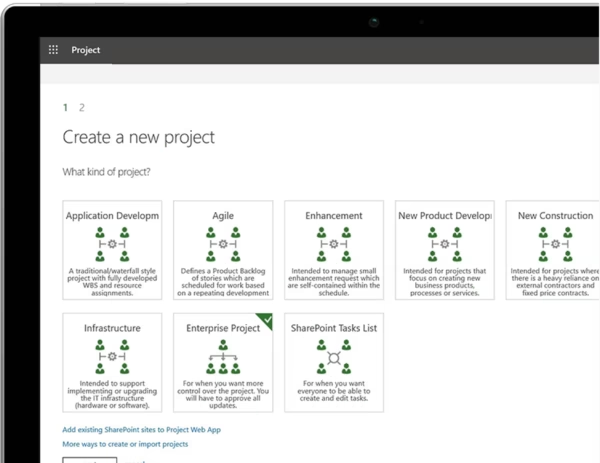
Microsoft Project 2024 Professional is the most advanced perpetual Project edition for Windows users who need more than just basic planning. It is built for project managers, consultants, and business users who need stronger control over schedules, workloads, and project execution.
This version is supplied as a Bind Key to Microsoft Account, meaning the license is linked to your Microsoft account during activation.
- ✅ Latest 2024 Professional edition
- ✅ Bind Key to Microsoft Account
- ✅ Advanced scheduling, resource handling & timesheets
- ✅ Instant delivery & activation support included
Warranty: Includes our 1-Month Activation Guarantee to be eligible for our lifetime replacement warranty.
SSL encrypted · refund if activation fails
Description
Why buy from Arco Software?
- ✅ Microsoft Partner (ID: 7033487): Ensure your license is authentic and secure.
- ✅ Instant Digital Delivery: Get started within minutes of purchase.
- ✅ 24/7 Support: We offer email and remote installation support if needed.
- ✅ Money-Back Guarantee: We offer a refund if activation fails (within the warranty period and according to our Terms & Conditions).
What is Microsoft Project 2024 Professional?
Microsoft Project 2024 Professional is the latest, most powerful project management software designed to help you plan projects, track progress, manage resources, and collaborate more efficiently. As a Microsoft Partner (ID: 7033487), we provide 100% genuine, new retail licenses.
This is a perpetual (non-subscription) Retail license for Windows that binds directly to your personal or business Microsoft Account. Because it is linked to your account, you can easily reinstall the software after formatting your PC or transfer the license to a new computer in the future by simply signing in.
Key Features of Microsoft Project 2024 Professional
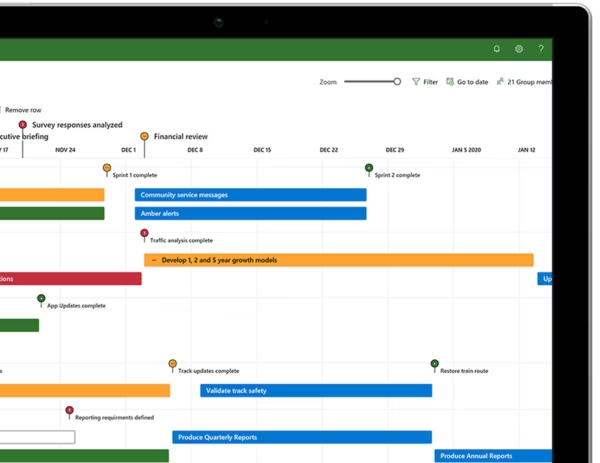
- ✅ Advanced Scheduling: Familiar tools like Gantt charts and pre-built templates help you create accurate project timelines and reduce setup time.
- ✅ Resource Management: Easily track workloads and assignments so you can manage resources more efficiently.
- ✅ Multiple Timelines: Present complex schedules clearly with visual timelines for better project communication.
- ✅ Comprehensive Reporting: Built-in reports help you monitor project progress, deadlines, and overall performance.
- ✅ Timesheets: Capture project and non-project time for reporting, billing, and management insights.
Product Specifications
| Brand | Microsoft |
|---|---|
| Edition | Project Professional 2024 |
| Key Format | Bind to MS Account (Retail) |
| License Type | Perpetual (Lifetime) |
| Intended Use | Business / Commercial / Personal Use |
| Language | Multilingual |
| Architecture | 64-bit (x64) default / 32-bit compatible |
| Activation Method | Online via setup.office.com |
| Region | Global |
How to Activate Your License
- After purchase, you will receive your Product Key via email instantly.
- Go to the official Microsoft redemption website: setup.office.com.
- Sign in with your Microsoft Account (or create a new one).
- Enter your 25-digit product key to link the software to your account.
- Download the installer directly from your Microsoft Account dashboard and install the software.
Note: Detailed installation instructions are provided in the confirmation email.
Minimum System Requirements
| Operating System | Windows 10 or Windows 11 |
|---|---|
| Processor | 1.6 GHz or faster, 2-core |
| RAM | 4 GB |
| Storage | 4 GB of available disk space |
| Graphics | DirectX 10 graphics card required for graphics acceleration |
Standard vs. Professional – Which One Do You Actually Need?
If you only need classic project planning, Gantt charts, task scheduling, and reporting, Project Standard 2024 is usually enough. But if you need advanced project control, stronger resource handling, and timesheets, Project Professional 2024 is the better fit.
| I need this feature… | Project 2024 Standard | Project 2024 Professional (This Product) |
|---|---|---|
| Project planning, timelines, Gantt charts, and task tracking | ✅ YES | ✅ YES |
| Advanced resource management | ❌ NO | ✅ YES |
| Timesheets for project and non-project work | ❌ NO | ✅ YES |
| Complex project management and control tools | ⚠️ LIMITED | ✅ YES |
| Best choice for | Users needing core planning and scheduling tools without extra cost | Project managers and business users needing advanced capabilities |
Frequently Asked Questions
Is this a subscription?
No. This is a perpetual (non-subscription) license with a one-time payment.
Can I transfer the license to a new computer?
Yes. Because this license binds to your Microsoft Account, you can transfer it to a new PC (ensure it is uninstalled from the previous PC first) by simply logging into your Microsoft account.
How many PCs can I use it on?
This license is for 1 PC. The software must only be used on one computer at a time.
Do I need an internet connection?
Only for the initial download, activation, and linking to your account. After that, Microsoft Project 2024 works fully offline.
Does it work on macOS?
No. This version is for Windows only.
Additional information
| Brand | Microsoft |
|---|---|
| Language | Multilingual |
| Edition | Professional |
| Architecture | 64-bit (x64) |
| Key Format | Bind Key (MS Account) |
| Activation Method | Bind to MS Account |
| Delivery Method | Instant Delivery |
| Number of Devices | 1 Device |
| Region | Global |
| Platform | Windows |
| Product Family | Project |
| Intended Use | Business / Commercial Use |
You might also like
-

Windows 10 Enterprise Retail License
18,90 €Price includes VAT where it applies.
Get my license → -
Sale!

Windows 10 Pro N – Retail License
Original price was: 21,90 €.11,90 €Current price is: 11,90 €.Price includes VAT where it applies.
Get my license → -
Sale!
Windows 11 Home N – Retail License Key
Original price was: 31,99 €.17,99 €Current price is: 17,99 €.Price includes VAT where it applies.
Get my license → -

Visio 2024 Professional – Retail License
34,90 €Price includes VAT where it applies.
Get my license →