-
×
 Windows 11 Home Retail License - Lifetime
1 × 17,99 €
Windows 11 Home Retail License - Lifetime
1 × 17,99 €
Subtotal: 17,99 €
 Windows 11 Home Retail License - Lifetime
1 × 17,99 €
Windows 11 Home Retail License - Lifetime
1 × 17,99 € Subtotal: 17,99 €


34,90 €
100 in stock
● In your inbox in under 3 minutes — instant digital delivery
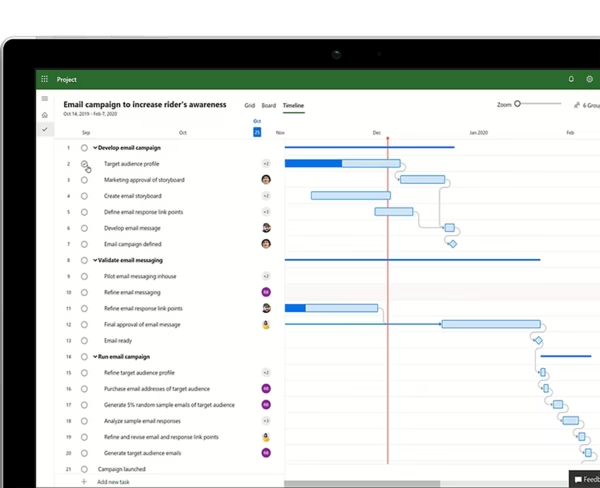
Microsoft Project 2024 Professional is the latest professional project management solution for Windows. It includes advanced planning, scheduling, resource management, timesheets, and reporting tools with a lifetime license—no subscriptions, no recurring fees.
As an Authorized Microsoft Partner (ID: 7033487), we provide genuine keys with Instant Online Activation.
Warranty: Includes our 1-Month Activation Guarantee to be eligible for our lifetime replacement warranty.
Microsoft Project 2024 Professional is the industry-leading project management software designed to help you plan projects, track progress, manage resources, and collaborate more efficiently. As an Authorized Microsoft Partner (ID: 7033487), we provide 100% genuine, new retail licenses.
This is a perpetual (non-subscription) Retail license for Windows. You pay once and own the software forever. Unlike account-bound licenses, this Retail key activates the software directly on your device, making it a strong choice for users who prefer a standard standalone installation without binding the product to a Microsoft account.
| Brand | Microsoft |
|---|---|
| Edition | Project Professional 2024 |
| Key Format | Retail Key (1 PC) |
| License Type | Perpetual (Lifetime) |
| Intended Use | Business / Commercial / Personal Use |
| Language | Multilingual |
| Architecture | 64-bit (x64) default / 32-bit compatible |
| Activation Method | In-app activation (Direct installation) |
| Region | Global |
Note: Detailed installation instructions are provided in the confirmation email.
| Operating System | Windows 10 or Windows 11 |
|---|---|
| Processor | 1.6 GHz or faster, 2-core |
| RAM | 4 GB |
| Storage | 4 GB of available disk space |
| Graphics | DirectX 10 graphics card required for graphics acceleration |
If you only need classic project planning, Gantt charts, task scheduling, and reporting, Project Standard 2024 is usually enough. But if you need advanced project control, stronger resource handling, and timesheets, Project Professional 2024 is the better fit.
| I need this feature… | Project 2024 Standard | Project 2024 Professional (This Product) |
|---|---|---|
| Project planning, timelines, Gantt charts, and task tracking | ✅ YES | ✅ YES |
| Advanced resource management | ❌ NO | ✅ YES |
| Timesheets for project and non-project work | ❌ NO | ✅ YES |
| Complex project management and control tools | ⚠️ LIMITED | ✅ YES |
| Best choice for | Users needing core planning and scheduling tools without extra cost | Project managers and business users needing advanced capabilities |
No. This is a perpetual (non-subscription) license with a one-time payment.
No. This product is supplied as a standard Retail key, not a bind-to-account version.
This license is for 1 PC. The software must only be used on one computer at a time.
Yes. Reinstallation is possible, but the software must remain in use on one PC only.
No forced account binding. This is a standard Retail installation and activation method, not a bind key setup.
No. This version is for Windows only.
Project 2024 Professional is suitable for project managers, consultants, engineers, businesses, and advanced users who need full-featured desktop project planning software.
| Brand | Microsoft |
|---|---|
| Language | Multilingual |
| Edition | Professional |
| Architecture | 64-bit (x64) |
| Key Format | Retail Key |
| Activation Method | Online Activation |
| Delivery Method | Instant Delivery |
| Number of Devices | 1 Device |
| Region | Global |
| Platform | Windows |
| Product Family | Project |
| Intended Use | Business / Commercial Use |
Price includes VAT where it applies. Business customers can enter a valid EU VAT number at checkout to have VAT removed.
Choose my license → This product has multiple variants. The options may be chosen on the product page
Price includes VAT where it applies. Business customers can enter a valid EU VAT number at checkout to have VAT removed.
Get my license →
Price includes VAT where it applies. Business customers can enter a valid EU VAT number at checkout to have VAT removed.
Get my license →
Price includes VAT where it applies. Business customers can enter a valid EU VAT number at checkout to have VAT removed.
Choose my license → This product has multiple variants. The options may be chosen on the product page