
Office Home 2024 Review: A One-Off Purchase That Still Makes Sense
Fix it now
Office Home 2024 is the one-off purchase, sold by Microsoft as a one-time purchase for 1 PC or Mac and for non-commercial use. You get security updates and no new features, and support runs to 9 October 2029. That trade, price certainty against a frozen feature set and a fixed end date, is the whole review.
- Buy it if you write documents and spreadsheets, keep your files locally or on a free OneDrive account, and want to stop paying every year.
- Buy it if the machine will be in service for several years, because that is what makes a perpetual licence pay against a subscription.
- Skip it if you need Outlook. That is Office Home & Business 2024, one tier up.
- Skip it if the apps will be used for business. Microsoft licenses this tier for non-commercial use, and commercial rights start at Home & Business.
- Skip it if you want Copilot or a terabyte of OneDrive storage, because both live on the subscription side and neither is coming to this licence later.
- Count the machines first. One licence installs once, on either a PC or a Mac; a second computer needs a second licence.
It is the SKU formerly called Office Home & Student. If somebody is looking for that name, this is the product they mean.
If the app list and the single device suit you, buy it. The next section is about the two things that decide whether the one-off purchase actually saves money.
Why it happens
What you get is the classic 2024 desktop versions of Word, Excel, PowerPoint and OneNote, installed once on either a PC or a Mac. Microsoft requires a Microsoft account: you sign in with it to install and manage the software, so use an account you control and will keep, rather than an address belonging to an employer or an internet provider you might leave.
The feature set is fixed at the release. Security updates arrive on the usual cadence, functionality does not change, and Microsoft is explicit that one-time purchases include no upgrade to the next major release, so moving to the next version means buying it at full price. Support runs from 1 October 2024 to 9 October 2029, a fixed five-year window rather than the ten years older perpetual releases enjoyed. That date is the one to do arithmetic against.
What is absent matters as much as what is included. There is no Copilot and no included cloud storage beyond the free OneDrive tier, where a Microsoft 365 subscription includes a terabyte. Cloud-dependent conveniences such as AutoSave and co-authoring still work against a free OneDrive account, but the storage that makes them practical is not part of this purchase.
The limitation that widens over time is structural. Features Microsoft ships after your release date never arrive. Over a five-year life that gap grows, most visibly in Excel, where new functions and data types appear in the subscription apps and simply do not exist in yours. If you regularly exchange complex workbooks with subscription users, expect the occasional formula that opens as an error because your build does not recognise it. That is not a defect; it is the trade you made.
The commercial-use restriction is the one that quietly catches people, because nothing enforces it and nothing warns you. Microsoft licenses Office Home 2024 for non-commercial use. Invoicing a client from a spreadsheet in it is outside that, and the fix is not a setting: it is Office Home & Business 2024, which is also the tier that includes Outlook. If you are unsure which side of the line you are on, buy the tier that covers you rather than the tier that costs less.
The arithmetic nobody can do for you needs two local prices and one honest answer. Divide the one-off price by the yearly subscription price and you have the number of years the perpetual licence must survive to break even. Then adjust for whether you need the storage, which is a large part of what the subscription actually sells, and for whether five years of support is longer than you intend to keep the machine. If the answer to both is no, the one-off purchase wins comfortably.
Full reference
Office Home 2024 against a subscription
| Consideration | Office Home 2024 | Microsoft 365 Personal |
|---|---|---|
| Payment | Once | Every month or year |
| Apps | Word, Excel, PowerPoint, OneNote | The subscription app set, including Outlook |
| New features after purchase | None. Security updates only | Continuously |
| Devices | Installs once, on one PC or Mac | Several devices for one person |
| Cloud storage | Free OneDrive tier only | 1 TB |
| Copilot | Not included | Included |
| Permitted use | Non-commercial | Check the plan’s own terms |
| Support ends | 9 October 2029 | While the subscription is active |
| If you stop paying | Keeps working | Apps become read-only |
Which tier you actually need
- Word, Excel, PowerPoint and OneNote, at home, on one machine: Office Home 2024 is the correct purchase.
- You need Outlook: Office Home & Business 2024, which is the tier where Outlook appears.
- The apps will be used for any business purpose: Home & Business, because Home is licensed for non-commercial use.
- You have a laptop and a desktop: two licences, or price a subscription that covers several devices for one person.
- You want Copilot or a terabyte of storage: the subscription, because neither is available on this side.
The account, and why it matters more than the media
The licence binds to the Microsoft account you redeem it with, and Microsoft states you must be signed in with that account to install and manage the software. There is no disc and no key to file away once redemption is done, which is convenient right up to the moment somebody loses access to the account. Use an account you personally control, record which one it is, and make sure whoever else uses the machine knows where that record lives.
Do not redeem a licence against an employer address or an internet provider’s email. Losing the account means losing the straightforward route to reinstalling, and the recovery path is a support conversation rather than a download.
Doing the break-even sum
- Take the one-off price of Office Home 2024 in your currency.
- Take the annual price of the subscription you would otherwise buy.
- Divide the first by the second. That is the number of years the perpetual licence has to survive to break even.
- Compare that against 9 October 2029, when support for Office 2024 ends, and against how long you expect to keep the machine.
- Add the value of the storage and the extra devices if you would use them, because that is usually what tips the comparison.
Living with a frozen release
- Expect newer Excel functions from subscription users to open as errors. Ask for values rather than formulas when it matters.
- Keep the machine patched. Security updates are the part of this licence that keeps working for you, so do not switch them off.
- Treat 9 October 2029 as the date you plan a replacement, not the date the software stops. The apps keep running; they stop receiving security updates, which makes them a poor place to open files from other people.
- Do not expect feature parity with a colleague on a subscription. It will drift, and the drift is one-directional.
- If a new feature becomes genuinely necessary, that is a new purchase at full price rather than an upgrade.
When a licence is the actual fix
If the app list covers what you do and the machine will be around for a few years, Office Home 2024 is a genuinely good buy, and it is the version to ask for by name rather than a vaguely described one-off Office. Arco supplies Office Home 2024 licences, and the useful thing we do is stop you buying the wrong tier: if you need Outlook, or the apps will be used for any business purpose, Office Home & Business 2024 is the licence that actually covers you, and buying Home first and discovering that afterwards means buying twice. Tell us what you plan to use it for and how many machines are involved, and we will confirm which tier applies before you order.
Questions people ask about this
Can I install it on my laptop as well as my desktop?
No. Microsoft describes it as a one-time purchase for 1 PC or Mac, and states that one-time purchases can be installed once on either a PC or a Mac. A second machine needs a second licence, which is the point at which a subscription covering several devices for one person starts to look like better value.
Does it include Outlook?
No. Office Home 2024 is Word, Excel, PowerPoint and OneNote. Outlook is what you pay the extra for in Office Home & Business 2024, and that tier is also the one licensed for commercial use, so the two reasons to move up usually arrive together.
Can I use it for my business?
Not on this tier. Microsoft licenses Office Home 2024 for non-commercial use. Nothing in the software stops you, which is exactly why people get this wrong. If the apps will be used for work of any kind, Office Home & Business 2024 is the licence that covers it.
Will the apps stop working when support ends?
No. They keep running indefinitely after 9 October 2029, but they stop receiving security updates, which makes them a poor place to open files that came from other people. Treat that date as when you plan a replacement rather than when the software dies.
Is it cheaper than Microsoft 365 in the long run?
It can be, and it depends on how long you keep it and whether you need the storage. Divide the one-off price by the annual subscription price to get the break-even in years, then compare that against the October 2029 support date and the life of the machine. If you also want a terabyte of cloud storage or Copilot, price those separately, because they usually tip the comparison the other way.
Need a genuine license? Choose your edition:
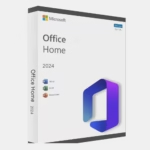
Microsoft Office Home 2024 (PC)
Original price was: 199,99 €.116,99 €Current price is: 116,99 €.
Get It Now
Microsoft Office 2024 Professional Plus - LTSC Volume key online activation
Original price was: 49,90 €.16,90 €Current price is: 16,90 €.
Get It Now
Microsoft Office Home & Business 2024 (Mac)
Original price was: 249,99 €.184,99 €Current price is: 184,99 €.
Get It Now
Microsoft Office Home & Business 2024 (PC)
Original price was: 249,99 €.218,99 €Current price is: 218,99 €.
Get It NowInstant digital delivery · Genuine license · 15 years trusted
Was this article helpful?
Your feedback helps us improve our documentation.
Thanks for your feedback.
Anything you'd like to add? (optional)
Related articles
Review Windows 11 Pro Review 2026: The Features Home Users Never See Review Exchange Server SE Enterprise Review: More Databases, Same Subscription Review Windows 365 Cloud PC Review: A Desktop You Never Have to Maintain? Review Microsoft 365 F3 Review: Frontline Licensing and Its Hidden Limits